English
 Arabic
 French
 Spanish
 Portuguese
 Deutsch
 Turkish
 Dutch
Dutch
 Italiano
 Russian
 Romaian
 Portuguese (Brazil)
 Greek
Greek
Hogwarts Castle Mosaic – Fan Photos Bring Magic to Life
Games |
2026-02-12 08:23:30
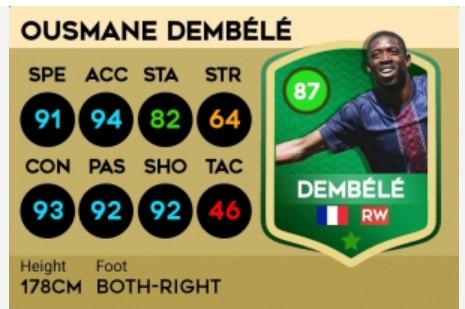
Dream League Soccer 26 has taken the mobile football gaming world by storm, and at the heart of its passionate community lies a powerful creative tool—the DLS 26 Card Creator. Whether you're a content creator looking for eye-catching thumbnails, a team builder showcasing your ultimate squad, or just a fan who wants to see their favorite player in a custom card, this tool has become absolutely essential. Let's dive into everything you need to know about it.
What Exactly Is the DLS 26 Card Creator?
Simply put, the DLS 26 Card Creator is an online, third-party tool that allows players to design fully customized player cards for Dream League Soccer 26. Unlike the limited customization options inside the official game, this web-based generator gives you complete control over every visual and statistical element of a card. Think of it as your personal design studio for football cards.
From picking the card's rarity color to fine-tuning individual stats like pace, shooting, and defending, the tool puts the power of a graphic designer right in your browser—no software download required.
Features That Make It a Game-Changer
Complete Stat Customization
The tool lets you manually set every attribute that matters in DLS 26: speed, acceleration, strength, stamina, passing, tackling, dribbling, and shooting. As you adjust these numbers, the overall rating (OVR) updates in real time, ensuring your custom card feels authentic to the game's mechanics.
Multiple Card Tiers and Designs
You're not stuck with just one look. The DLS 26 Card Creator offers a wide range of templates including:
· Common cards (bronze, silver, gold)
· Elite cards (platinum, diamond)
· Special editions (Team of the Week, Man of the Match, Rookie, Legend, Icon, Flashback)
· Seasonal designs (Halloween, Christmas, Anniversary)
Personalized Visual Elements
Go beyond basic stats. You can add:
· Player name and jersey number
· Nationality flag with country name
· Club logo and league badge
· Preferred foot and weak foot rating (1 to 5 stars)
· Skill moves level
· Custom background images or solid colors
· Animated borders and holographic shine effects
Upload Your Own Images
This is where the magic happens. Want to put your own face on a card? Or create a tribute card for a retired legend using a real photo? The tool allows you to upload any image as the player avatar, making each card truly one of a kind.
High-Quality Exports
Once your masterpiece is complete, you can download it as a high-resolution PNG file with a transparent background. This makes it perfect for YouTube thumbnails, Instagram posts, Discord avatars, or even printing as a physical collectible.
How to Use the DLS 26 Card Creator (Step-by-Step)
Creating your first card takes less than five minutes. Here's how:
1. Find a reliable creator website – Popular options include, and various fan-made platforms. Stick to trusted sites to avoid ads or broken features.
2. Choose a card template – Browse through the available designs and pick one that fits your vision. Most tools organize templates by rarity and event type.
3. Enter player information – Fill in the player's name, position (GK, CB, CM, ST, etc.), nationality, and jersey number.
4. Set the stats – Use sliders or number inputs to adjust each attribute. The OVR will automatically calculate based on your choices.
5. Upload an image – Click the upload button and select a photo from your device. For best results, use a square, high-contrast image with the player's face clearly visible.
6. Add badges and logos – Choose a club badge and league logo from the built-in library, or upload your own.
7. Fine-tune the design – Adjust background colors, add a card shine effect, or enable animated elements if supported.
8. Preview and download – Take a final look at your card. If everything looks good, hit the download button and save your creation.
Why the Community Loves It
The DLS 26 Card Creator has become a staple in the community for several reasons:
Content Creation – YouTube creators use these cards for team reveal videos, draft challenges, and fantasy league content. A well-designed card thumbnail gets more clicks.
Fantasy Team Building – Want to see what a 99-rated version of your local club's striker would look like? The tool lets you dream big.
Tribute Cards – Fans regularly create memorial cards for retired players or legends who never appeared in DLS officially.
Online League Management – Many fan-run DLS leagues use custom cards to represent created players, adding a layer of professionalism to their competitions.
Pure Fun – Sometimes, you just want to make a card of your friend who thinks he's the next Haaland.
Limitations to Keep in Mind
While powerful, the DLS 26 Card Creator isn't perfect. Here are a few honest drawbacks:
· Not an official tool – First Touch Games, the developer of Dream League Soccer, does not endorse or support these creators. Cards made here cannot be imported into the actual game.
· Quality varies by website – Some creators have outdated templates, intrusive ads, or limited customization options. You may need to try a few before finding your favorite.
· Mobile experience – While most tools work on phones, the interface is often optimized for desktop browsers. Card creation on a small screen can be fiddly.
Is It Legal to Use?
This is a fair question. The DLS 26 Card Creator operates in a gray area. It uses visual elements inspired by Dream League Soccer but typically doesn't copy proprietary assets directly. Most creators operate under fan art provisions and do not charge money for their tools.
If you're using the cards for personal enjoyment, social media sharing, or non-monetized YouTube content, you're unlikely to face any issues. However, selling cards or claiming official endorsement would be problematic. Always give credit to First Touch Games when sharing your creations publicly.
Pro Tips for Stunning Cards
Want your cards to stand out? Keep these tips in mind:
· Use high-quality source images – Blurry player photos ruin an otherwise great card.
· Match card color to rating – Bronze (60-69), Silver (70-79), Gold (80-89), Elite (90+). This keeps your card believable.
· Don't overinflate stats – A 110-rated player card looks silly unless you're going for comedy.
· Add context – Include a small caption or watermark if you're sharing professionally.
· Save your work – Some tools offer a save code or JSON export. Use it if you plan to edit later.
The Bottom Line
The DLS 26 Card Creator is a fantastic, accessible tool that adds a whole new dimension to the Dream League Soccer experience. It's not about cheating or hacking—it's about creativity, community, and having fun with football design. Whether you're making serious team graphics or silly cards of your pet dog in a goalkeeper jersey, this tool delivers professional-looking results in minutes.
So go ahead. Design your dream squad. Create that Messi vs. Ronaldo tribute card. Make a 99-rated version of yourself. The only limit is your imagination.