


How to Create an ERP Implementation Budget
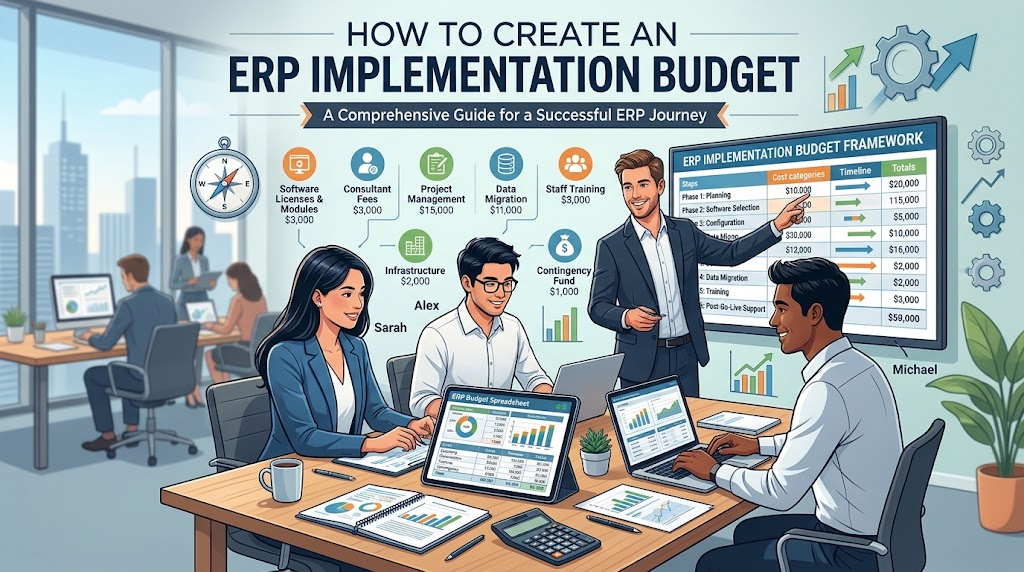
Implementing an Enterprise Resource Planning (ERP) system is a major business investment, but the real cost goes beyond the software license. A successful ERP implementation budget should account for software, infrastructure, customization, data migration, employee training, integration, support, and unexpected expenses. Building a realistic budget before implementation helps businesses control costs, avoid financial surprises, and measure the return on their ERP investment.
For businesses evaluating Erp software in dubai, creating a detailed implementation budget is especially important because ERP projects may involve multiple departments, cloud infrastructure, regulatory requirements, integrations, and ongoing support. A structured budget allows decision-makers to compare ERP solutions based on their total cost of ownership rather than focusing only on the initial software price.
What Is an ERP Implementation Budget?
An ERP implementation budget is a financial plan that estimates all costs associated with selecting, deploying, customizing, maintaining, and improving an ERP system. It should cover both one-time implementation expenses and recurring operational costs.
A complete ERP budget typically includes:
- ERP software licenses or subscriptions
- Implementation and consulting fees
- Hardware or cloud infrastructure
- Data migration
- System customization
- Third-party integrations
- Employee training
- Testing and quality assurance
- Project management
- Technical support
- Security and compliance
- Ongoing maintenance
- Contingency funds
The purpose is not simply to determine how much the ERP system will cost. It is to understand how much the entire ERP project will require from planning through long-term operation.
Why Is ERP Budgeting Important?
Poor budgeting is one of the common reasons ERP projects experience financial pressure. Businesses may initially focus on the software price while overlooking costs such as customization, integration, training, or post-launch support.
A detailed ERP implementation budget helps businesses:
- Set realistic financial expectations.
- Compare vendors more accurately.
- Identify unnecessary expenses.
- Allocate resources effectively.
- Reduce the risk of budget overruns.
- Prepare stakeholders for long-term costs.
- Calculate potential return on investment.
- Prioritize essential ERP features.
A budget also gives project managers a financial benchmark. If implementation costs begin to exceed the approved amount, the team can investigate the reason and make adjustments before the problem becomes serious.
Step 1: Define Your ERP Requirements
The first step in creating an ERP budget is defining what the business actually needs.
Start by documenting the departments and processes that the ERP system must support. Depending on the organization, these may include:
- Accounting and finance
- Sales and CRM
- Inventory management
- Procurement
- Human resources
- Payroll
- Manufacturing
- Supply chain management
- Project management
- Customer service
- Business intelligence and reporting
Not every business needs every ERP module. Clearly identifying requirements prevents organizations from paying for unnecessary functionality.
At this stage, also determine the number of users, business locations, expected transaction volume, reporting requirements, and required integrations.
Step 2: Estimate ERP Software Costs
Software is usually one of the most visible parts of an ERP budget, but pricing models vary significantly.
ERP vendors may charge through:
- Per-user subscriptions
- Module-based pricing
- Tiered packages
- Annual licenses
- One-time perpetual licenses
- Usage-based pricing
Cloud ERP systems generally use subscription-based pricing, while some on-premises solutions require larger upfront investments in licenses and infrastructure.
When comparing software costs, look beyond the advertised starting price. Ask vendors whether the quoted amount includes additional users, advanced modules, updates, support, reporting tools, mobile access, and security features.
Step 3: Include ERP Implementation and Consulting Costs
ERP implementation often requires professional expertise. Consultants or implementation partners may help with system configuration, process mapping, project management, testing, migration, and deployment.
Implementation fees can depend on:
- Number of modules
- Number of users
- Business complexity
- Number of locations
- Customization requirements
- Data volume
- Integration requirements
- Implementation timeline
A simple ERP deployment for a small company may require considerably fewer resources than a multi-location implementation involving complex workflows and numerous integrations.
Ask vendors for a detailed implementation quotation instead of accepting a single broad figure. This makes it easier to understand exactly where the money will be spent.
Step 4: Budget for Customization
ERP platforms are designed to support many business processes out of the box, but organizations sometimes require customization.
Customization may include:
- Custom workflows
- Specialized dashboards
- Industry-specific forms
- Unique approval processes
- Custom reports
- Additional fields
- Automated business rules
Customization can increase implementation costs and future maintenance requirements. Therefore, businesses should carefully evaluate whether a customization is essential.
A useful budgeting principle is to configure before customizing. If the ERP can support a process through standard configuration, changing the software unnecessarily may increase costs without providing enough additional value.
Step 5: Calculate Data Migration Costs
Data migration is another important part of an ERP implementation budget.
Businesses may need to transfer information from spreadsheets, legacy ERP systems, accounting applications, CRM platforms, or other databases.
Migration activities can include:
- Data extraction
- Data cleansing
- Data transformation
- Data mapping
- Data validation
- Data import
- Post-migration verification
The more inaccurate or unstructured the existing data is, the more effort migration may require.
Companies should also determine which historical data needs to be migrated. Moving every record may not always be necessary. In some cases, businesses can migrate active and important historical records while securely archiving older information.
Step 6: Account for Integration Costs
Modern businesses rarely operate with one system alone. An ERP platform may need to communicate with payment gateways, e-commerce platforms, banking systems, CRM software, payroll applications, warehouse systems, logistics platforms, or business intelligence tools.
Integration costs depend on:
- Number of systems
- API availability
- Data complexity
- Integration frequency
- Security requirements
- Custom development requirements
During budgeting, create a complete list of systems that need to connect to the ERP. This prevents integration expenses from appearing unexpectedly during implementation.
Step 7: Include Employee Training
Training is often underestimated, yet it can significantly affect ERP adoption and project success.
Employees need to understand how the new system changes their daily processes. Training costs may include:
- Instructor-led sessions
- Online courses
- Training materials
- User manuals
- Workshops
- Practice environments
- Post-launch support
Training should be based on user roles. For example, accountants may need detailed financial module training, while warehouse employees may primarily need inventory and order-management training.
A strong training budget can reduce errors, improve adoption, and shorten the time required for employees to become comfortable with the new system.
Step 8: Budget for Infrastructure and Security
Infrastructure costs depend on whether the ERP is cloud-based, hosted privately, or installed on company-owned servers.
For on-premises ERP systems, businesses may need to budget for:
- Servers
- Storage
- Networking equipment
- Backup systems
- Operating systems
- Database infrastructure
- Security tools
- IT administration
Cloud ERP implementations may reduce some infrastructure expenses but can introduce recurring cloud subscription and storage costs.
Security should also be included in the budget. Organizations may need identity management, access controls, backup solutions, monitoring, encryption, and compliance-related capabilities.
Step 9: Include Testing and Quality Assurance
Testing should never be treated as an optional expense.
Before going live, organizations should test:
- Business workflows
- User permissions
- Financial transactions
- Reports
- Data migration
- Integrations
- Automated processes
- Performance
- Security controls
User acceptance testing is particularly important because employees can identify practical issues that may not appear during technical testing.
Allocating sufficient time and money for testing can prevent expensive problems after launch.
Step 10: Plan for Ongoing ERP Costs
An ERP implementation budget should not stop at the go-live date. Businesses should calculate recurring costs for at least three to five years when evaluating the total cost of ownership.
Ongoing expenses may include:
- Software subscriptions
- Technical support
- Maintenance
- Cloud hosting
- Additional users
- Software upgrades
- Security services
- Backup
- Training for new employees
- Future integrations
- Additional modules
A solution with a lower initial cost may become more expensive over time if its recurring fees are high. Therefore, businesses should compare both upfront and long-term costs.
Step 11: Create an ERP Contingency Fund
Even well-planned ERP projects can encounter unexpected expenses.
A contingency budget provides financial protection for issues such as:
- Additional customization
- Data quality problems
- Extended implementation timelines
- Unexpected integration work
- Additional training
- Technical issues
- Scope changes
The appropriate contingency percentage depends on project complexity and organizational risk. More complex implementations generally require greater financial flexibility.
ERP Implementation Budget Example
A simple ERP budget structure can look like this:
|
Cost Category |
Budget Consideration |
|
Software |
Licenses or subscriptions |
|
Implementation |
Consulting and configuration |
|
Customization |
Development and specialized workflows |
|
Data Migration |
Extraction, cleansing, and import |
|
Integration |
Connecting third-party systems |
|
Training |
Employee education and materials |
|
Infrastructure |
Cloud or on-premises technology |
|
Testing |
Quality assurance and user acceptance |
|
Support |
Technical assistance after launch |
|
Contingency |
Unexpected project expenses |
This structure can be expanded based on the size and complexity of the organization.
How Can Businesses Reduce ERP Implementation Costs?
Reducing ERP costs does not mean choosing the cheapest system. Instead, businesses should focus on achieving the required functionality with minimal unnecessary complexity.
Several strategies can help:
Prioritize Essential Features
Start with business-critical requirements. Avoid purchasing modules simply because they are available.
Limit Unnecessary Customization
Use standard ERP functionality whenever possible. Excessive customization can increase implementation and maintenance costs.
Clean Data Before Migration
Removing duplicate, outdated, and inaccurate records before migration can reduce technical effort.
Train Internal Teams
Developing internal ERP expertise can reduce dependency on external consultants over time.
Use a Phased Implementation
Large organizations can implement high-priority modules first and introduce additional functionality later. This can distribute costs and reduce implementation risk.
Compare Total Cost of Ownership
Evaluate the ERP's cost over several years rather than comparing only the initial purchase price.
What Should Be Included in an ERP Budget?
At minimum, an ERP implementation budget should include software, implementation services, customization, data migration, integrations, training, infrastructure, testing, support, security, and contingency costs. Businesses should also include recurring expenses such as subscriptions, maintenance, upgrades, additional users, and future training.
How Do You Calculate ERP Return on Investment?
After estimating the total ERP cost, businesses should compare it with expected financial and operational benefits.
Potential benefits may include:
- Reduced manual work
- Lower administrative costs
- Faster reporting
- Improved inventory control
- Fewer data-entry errors
- Better cash-flow visibility
- Faster order processing
- Improved employee productivity
- Better decision-making
A basic ROI calculation can compare the financial benefits generated by the ERP with the total cost of implementation and operation.
However, not every ERP benefit is immediately measurable in financial terms. Better visibility, improved compliance, faster decision-making, and stronger customer service can also create significant long-term business value.
Final Thoughts
Creating an ERP implementation budget requires more than estimating the price of ERP software. Businesses need to consider the entire lifecycle of the project, from requirements analysis and implementation to training, migration, integration, support, and future expansion. A detailed budget helps organizations make informed decisions, control spending, and build a stronger business case for ERP adoption.
The best ERP budget is realistic, flexible, and aligned with business objectives. By understanding total cost of ownership and prioritizing essential functionality, organizations can avoid unnecessary expenses while maximizing the value of their ERP investment. Businesses evaluating solutions such as ERP 360 can use this budgeting approach to assess implementation requirements, compare costs, and plan for sustainable ERP growth.
Categorias
Leia mais
The Essence of Sydney's Japanese Dining Surge The growing focus on Japanese fine dining Sydney stems from a focus on seasonal seafood, master knife skills, and direct counter service. Chefs pair local Australian produce with old-world Japanese methods to build menus that balance clean textures with rich umami depth. This quiet dedication to detail turns routine evenings into rare culinary...

在現代高端香煙與煙草品味的世界中,包裝設計與煙草質感的完美結合,往往能為品煙者帶來超越期待的感官享受。Cavallo 黑純法拉利 以其獨樹一幟的經典黑純視覺與精緻工藝,在眾多菸草產品中脫穎而出。這款被許多菸民親切稱為「法拉利」的產品,不僅僅是一種煙草製品,更是時尚生活態度與個人品味展現的象徵。從流線型的包裝線條到深沉內斂的黑純色調,每一個細節都透露出源自頂級工藝的匠心獨具,為追求極致品味的消費者帶來無與倫比的視覺與味覺體驗。 奢華品味與極致工藝的結晶 在香煙市場日益多元化的今天,品味香煙早已不再只是單純的生理滿足,而是一種生活儀式感的展現。Cavallo 黑純法拉利 正是在這種背景下應運而生,它成功將現代設計美學與傳統煙草調配技術融入產品之中。黑純的色調象徵著神祕、高貴與沉穩,給人一種強烈的視覺衝擊感,令人聯想到同名的義大利頂級跑車品牌所代表的速度、力量與極致美學。...

Microneedling Service in Chevy Chase, MD: Renew Your Skin Naturally Uneven texture, enlarged-looking pores, acne scars, and fine lines can make your complexion appear less smooth than you would like. A professional Microneedling Service in Chevy Chase, MD offers a minimally invasive approach designed to support the skin’s natural renewal process and improve its overall...

Whether you're towing a camper, work trailer, utility trailer, or caravan, keeping your equipment organized and protected is essential for a smooth journey. Loose tools and accessories can quickly create clutter, reduce efficiency, and even become damaged during transport. A premium Trailer Tool Box provides a practical storage solution that enhances security, improves organization, and...
Elevate Your Streetwear Game with Trapstar Sweatpants When it comes to premium streetwear, Trapstar Sweatpants have become a must-have for fashion enthusiasts who appreciate both comfort and bold design. Inspired by London's influential street culture, Trapstar has earned a global reputation for creating apparel that combines luxury craftsmanship with authentic urban style. Whether you're...